
Quick answer: what most homes actually back up
Most homeowners do not try to run the whole house during an outage. Instead, they choose critical loads (the things that keep life normal and safe), such as:
- Refrigerator/freezer
- Internet + phone charging
- Some lights
- Medical devices (if needed)
- A few outlets and small appliances
Whole-home backup is possible, but it usually requires more battery power (kW) and more battery energy (kWh)—and often more electrical work.
If you want the “two numbers that decide backup,” start here (then come back): solar battery kW vs kWh explained.
Safety note (USA): what you should NOT DIY
This guide is for planning and quote comparison only.
- Don’t open your electrical panel.
- Don’t move breakers.
- Don’t attempt “critical loads panel” work yourself.
Backup wiring, transfer equipment, and interconnection must be designed and installed by licensed professionals and approved by your local AHJ/utility.
Also: standard grid-tied solar typically shuts down during outages unless your system is designed for backup. Read: Do solar panels work during a power outage?
Step 1 — Pick your backup goal (critical loads vs whole-home)
The “critical loads” idea (why most systems use it)
Critical loads backup is popular because it gives you the best “comfort per dollar”:
- You protect essentials
- You can get long runtime from a smaller battery
- You avoid oversizing for rare events
This matches the safe planning mindset in: Solar system components & sizing basics.
What changes if you want whole-home backup
Whole-home backup can mean:
- Running big loads (HVAC, well pump, electric range, dryer)
- Covering large startup surges (motors/compressors)
- Maintaining comfort during multi-day outages
Translation: you’ll likely need more kW (instant power) and more kWh (stored energy), plus a stronger electrical design. For many homes, “whole-home” is less about one bigger battery and more about multiple batteries + load management.
Step 2 — Build your critical loads list (watts + hours)
Battery sizing becomes easy once you write down two things:
- How much power each load needs (watts)
- How long you want to run it (hours)
Running watts vs surge watts (simple explanation)
Some devices draw:
- Running power (steady use)
- Surge power (a brief spike at startup), common with refrigerators/freezers, sump pumps, well pumps, and some fans/HVAC equipment
If your battery/inverter can’t handle the surge, the load may fail to start even if you have enough kWh.
How to estimate watts safely (no panel work)
Use:
- The appliance label (nameplate)
- The manual/spec sheet
- A plug-in energy monitor for plug loads (optional)
- Your home energy monitor / solar monitoring app for trends (if installed)
If you’re learning to interpret monitoring data, this helps: How to read your solar monitoring app.
Step 3 — Convert loads into battery size (kWh) and power (kW)
The two math steps you need
You must check both:
- Energy (kWh) needed for your chosen outage duration
- Power (kW) needed to run multiple loads and start surges
Step A — Energy: kWh needed
For each load:
Daily energy (kWh) = (Watts ÷ 1000) × Hours used
Then sum all critical loads.
Step B — Power: kW needed
At any given moment:
Total running power (kW) = (sum of watts running at the same time) ÷ 1000
Then add surge considerations (especially for refrigerators and pumps).
This “kW + kWh” dual requirement is why quotes confuse people—and why this refresher matters: solar battery kW vs kWh.
Table: Critical loads worksheet (copy/paste)
| Load (critical) | Running watts (W) | Surge watts (W) | Hours/day during outage | Energy (kWh/day) | Notes |
|---|---|---|---|---|---|
| Refrigerator | 150–250 | 800–1200 | 8–12 (cycles) | =W/1000×hrs | cycles, surge matters |
| Wi-Fi + modem | 10–30 | same | 24 | easy win | |
| Phone charging | 5–20 | same | 2–4 | ||
| Lights (LED) | 5–12 each | same | 4–6 | count bulbs | |
| TV/laptop | 50–200 | same | 2–4 | ||
| Medical device | varies | varies | varies | confirm specs | |
| Microwave (optional) | 800–1500 | same | 0.2 | short bursts | |
| TOTAL | Σ kWh |
Tip: if you don’t know exact watts, be conservative—overestimate a bit.
Usable kWh: the number that actually matters
Batteries have a “nameplate” capacity (kWh), but you typically can’t (or shouldn’t) use 100% of it.
A practical planning formula is:
Usable kWh ≈ Nameplate kWh × DoD × Efficiency
- DoD (depth of discharge) reflects how much is usable while protecting longevity. Deep dive: Solar battery depth of discharge (DoD).
- Efficiency includes conversion losses. Deep dive: Solar battery round-trip efficiency.
Add a real-life buffer
After you compute usable kWh, add a buffer because batteries degrade over time and conditions aren’t perfect. A simple rule is to add 15–25% unless your installer provides a modeled design.
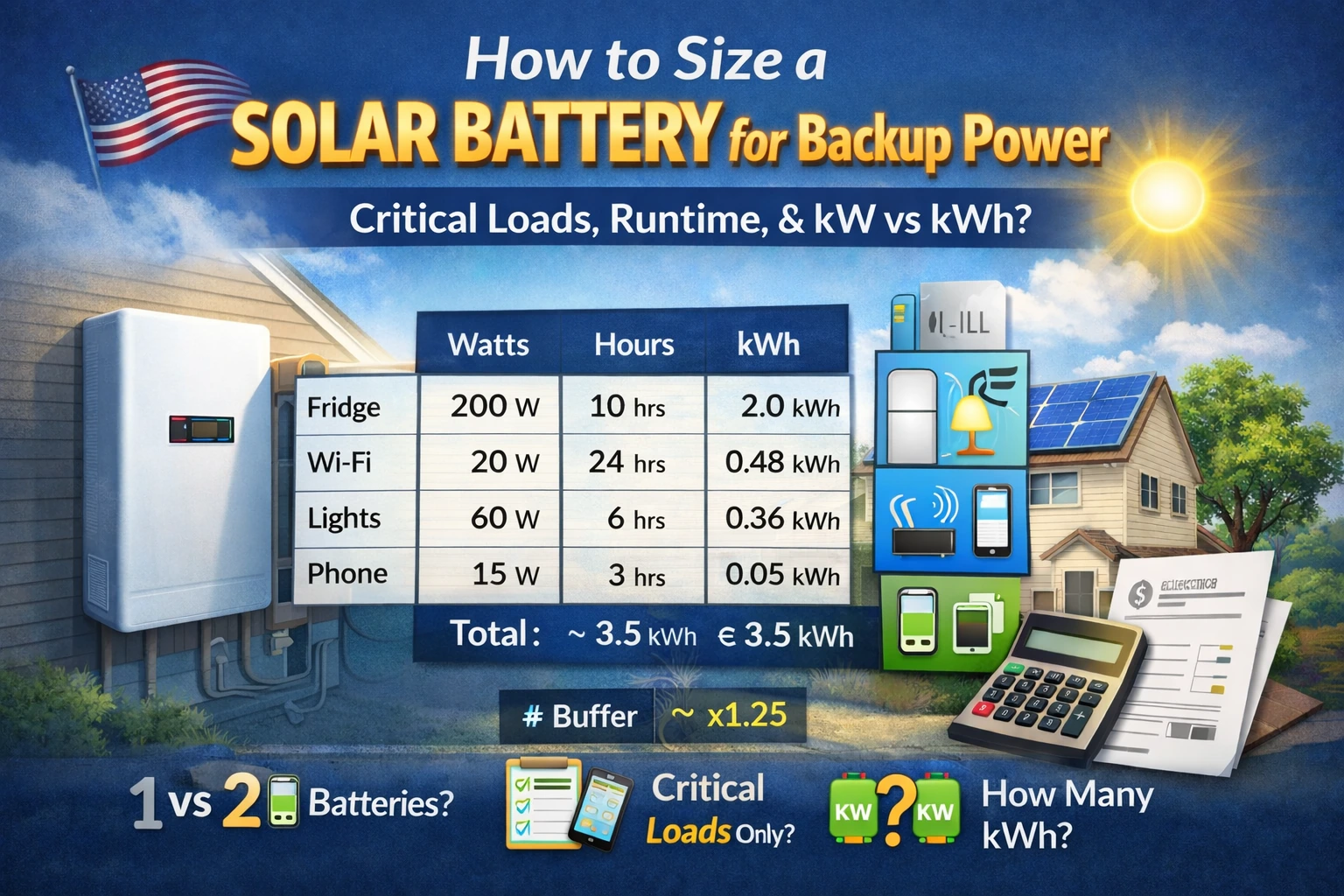
Worked example 1: “Essentials” backup (realistic)
Goal: keep food safe, communications up, a few lights on for a 24-hour outage.
Assume these loads:
- Fridge: 200 W average while cycling, 10 hours/day → 2.0 kWh/day
- Wi-Fi/modem: 20 W × 24h → 0.48 kWh/day
- Lights: 6 LED bulbs × 10 W × 5h → 0.30 kWh/day
- Phone charging: 15 W × 3h → 0.045 kWh/day
- Laptop: 60 W × 3h → 0.18 kWh/day
Total ≈ 3.0 kWh/day
Now convert to battery size:
- If you want one full day with buffer, plan about 3.0 × 1.25 = 3.75 kWh usable.
- If your battery is 10 kWh nameplate with ~90% usable (example), you have plenty of energy for essentials.
Power check: running loads might be ~300–600 W at a time, but a fridge surge could be 800–1200 W. So you need a system that can deliver around ~2 kW comfortably (varies by fridge).
Worked example 2: “Comfort backup” (bigger loads)
Goal: essentials + some comfort loads (more lights, bigger electronics, brief microwave use, fans, etc.).
You might reach 6–12 kWh/day depending on what you include and how long you run it. At that point:
- One battery may still work for short outages
- Two batteries may be needed for multi-day outages or bigger loads
- Whole-home backup (including HVAC) usually requires multiple batteries + load management
Reality check: PV + storage resilience varies by season and sunlight. Source: NREL resilience research shows outage duration and solar conditions can change outcomes significantly.
Step 4 — Check solar recharge reality (optional but important)
“Sunlight backup” isn’t the same as full backup
Even with solar and a battery, you may be limited in what loads you can run. Some systems only provide limited daytime power without enough stored energy.
Start here: Do solar panels work during a power outage?
When a generator makes more sense
If you need long multi-day coverage in winter, high-power loads, or maximum reliability, a hybrid approach (battery + generator) can be more economical than huge battery banks. Source: NREL reliability research.
Decision table: 1 battery vs 2 vs whole-home backup
| Your goal | Typical approach | What matters most | Common mistake |
|---|---|---|---|
| Keep essentials running (fridge, internet, lights) | 1 battery + critical loads | kW surge + modest kWh | Buying kWh but ignoring surge |
| Essentials + comfort loads | 1–2 batteries | Usable kWh + recharge plan | Underestimating daily kWh use |
| Whole-home, including big loads | 2+ batteries + load management | High kW + large kWh + panel design | Expecting “whole-home” without load planning |
Warranty note: if you cycle daily for TOU savings, throughput matters more than if you only use the battery for rare outages. Read: Solar battery throughput warranty explained.
What to ask your installer (copy/paste checklist)
- “Can you size my system around a critical loads list—not whole-home?”
- “What is the battery’s continuous kW and surge kW, and is it enough for my fridge/pumps?”
- “What usable kWh are you assuming (DoD + reserve)?”
- “What efficiency assumptions are you using (AC vs DC coupling)?” See: AC-coupled vs DC-coupled solar batteries
- “How many hours of runtime do I get for my critical loads on a cloudy day?”
- “Can you show a modeled outage scenario (winter vs summer)?”
- “If I later add EV/heat pump, what changes in backup sizing?”
- “What happens during an outage: will my solar recharge the battery and under what limits?”
FAQ
1) How many kWh battery backup does a home need?
It depends on whether you’re backing up critical loads (often a few kWh/day) or trying for whole-home (often much more). The method in this guide shows how to calculate your number.
2) Why do I need to check both kW and kWh?
Because kW is whether your battery can run/start loads, and kWh is how long it lasts. Start here: solar battery kW vs kWh.
3) What’s “usable kWh” and why isn’t it the same as nameplate?
Usable kWh accounts for DoD limits and losses (efficiency). Read: battery depth of discharge and battery round-trip efficiency.
4) Can I run AC (air conditioning) on a battery?
Sometimes, but it often requires high kW (power) and substantial kWh (energy), plus careful electrical design and load planning.
5) Will solar recharge my battery during an outage?
Only if your system is designed for backup operation; standard grid-tied solar usually shuts down when the grid is down. Read: Do solar panels work during a power outage?
6) Should I size for “worst-case” multi-day outages?
If you truly need multi-day coverage, consider a hybrid approach (battery + generator) or higher autonomy with realistic seasonal modeling.